
The Complete Label Printer Guide for Australian Manufacturers (2026)
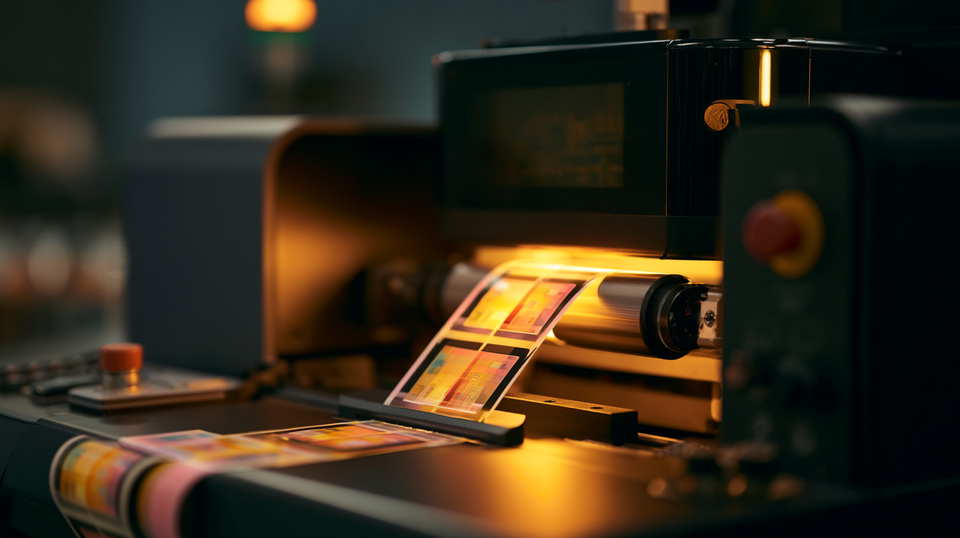
Your label supplier just told you the order won't arrive for three weeks. Your production line runs Friday. You have two SKUs changing due to a FSANZ allergen update, a seasonal variant launching next month, and a retailer demanding GS1-compliant carton labels by end of week.
This is not a hypothetical. It is the operational reality facing Australian manufacturers in 2026—and it is precisely why investment in label printers has accelerated faster in the past two years than at any point in the previous decade.
The Australian digital printing market was valued at USD 644 million in 2025 and is forecast to reach USD 1.024 billion by 2034, growing at a 5.13% CAGR. The global label printing market is expanding at 7.4–7.9% CAGR, projected to reach USD 75.28 billion by 2030. These are not abstract figures. They represent thousands of Australian manufacturers, brand owners and print shops concluding that waiting on external suppliers is no longer acceptable as a production strategy.
This guide covers every practical dimension of choosing a label printer in Australia: what the technology does, how to match it to your industry and volume, what it costs in AUD, and how to avoid the most expensive mistakes buyers make. Whether you are investing for the first time or upgrading equipment that can no longer keep pace, the decisions you make here will affect your production agility for the next five to seven years.

Prefer to talk it through? Call (03) 9318 7177. Gulmen Digital's team is in Ravenhall, VIC.
What Is a Label Printer?
A label printer is a specialised production device designed to print self-adhesive labels, tags or flexible media on rolls, sheets or specialty substrates—configured specifically for industrial, commercial or operational labelling workflows rather than general document output.
That distinction matters more than it sounds. A standard office printer handles A4 paper at low duty cycles. A label printing machine handles roll media at continuous production speeds, with precise registration, durable ink or toner adhesion, and compatibility with a range of synthetics, papers, films and adhesives that an office device cannot process.
Desktop vs Industrial vs Commercial
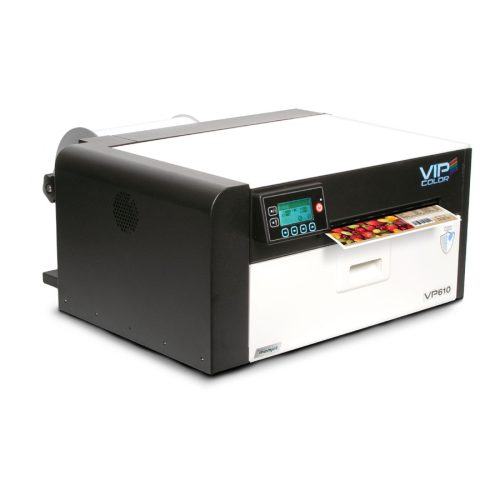
Desktop label printers sit on a production bench or office desk. They suit low to medium volumes, hundreds to a few thousand labels per shift; and are the most common first step for SMEs bringing label production in-house. Capital cost is manageable, footprint is small, and the learning curve is reasonable.
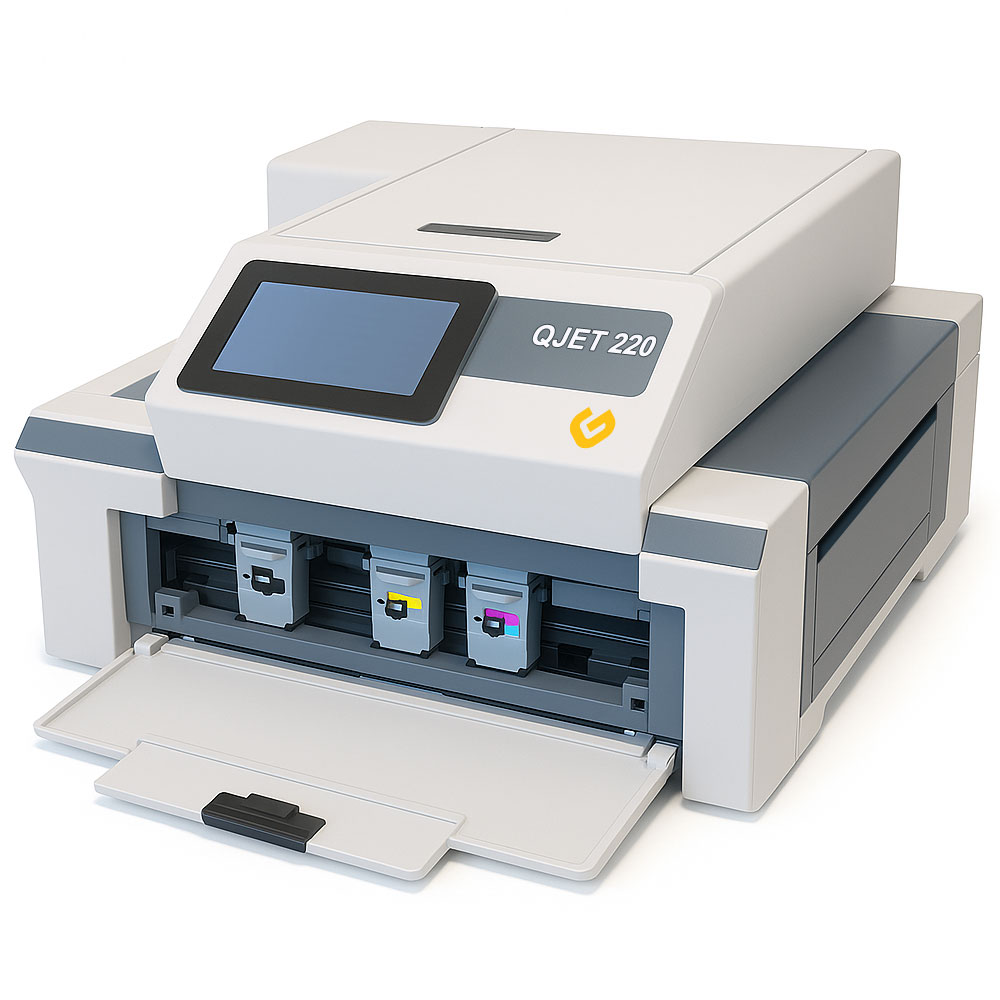
Industrial label printers are built for continuous, multi-shift operation. They handle wider media, higher speeds, heavier roll weights and more demanding environments. These are the machines that belong in a production facility or a trade print shop generating tens of thousands of labels per day.
Commercial / press-level label printers are high-end digital presses—roll-to-roll systems used by label converters and larger manufacturers printing labels for multiple brands at scale. They combine printing with inline finishing and inspection, and represent a substantial capital investment.
Inkjet vs Laser vs Thermal
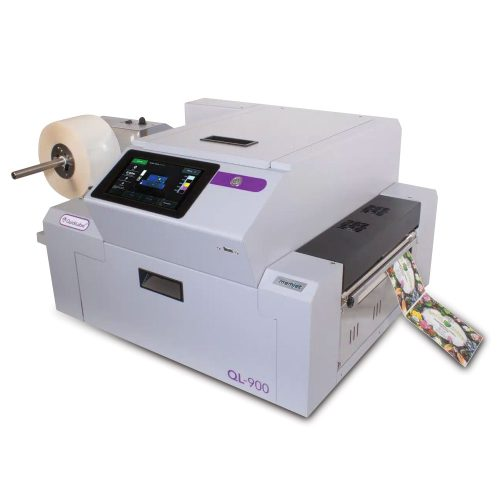
Inkjet label printers deposit liquid ink (dye, pigment or UV-curable) onto the substrate. Modern industrial inkjet delivers photo-quality full colour, excellent colour gamut, and flexible media handling. Pigment inks provide meaningful light and water resistance; UV-curable inks offer the highest durability for harsh environments.
Laser (toner-based) label printers use electrophotographic technology, the same mechanism as office laser printers; with toner fused to the label substrate by heat. They produce sharp, high-contrast text and graphics, perform consistently on coated papers, and are a reliable choice for office-adjacent production environments.
Thermal label printers operate without liquid ink or toner. Direct thermal heats a chemically treated substrate to produce an image. Thermal transfer uses a ribbon, wax, wax/resin, or full resin; to transfer ink onto the label, producing more durable output on synthetics and papers. Both are monochrome systems optimised for barcodes, logistics labels and compliance marking.
Roll-to-Roll vs Flatbed
Roll-to-roll label printers unwind blank label stock, print continuously, and rewind finished output onto rolls ready for finishing or direct application. This is the dominant format for industrial label production and integrates naturally with downstream finishing equipment such as laminators, die-cutters and slitters.
Flatbed and sheet-fed systems print on individual sheets or flat panels. These suit prototyping, very short runs, specialty rigid substrates or operations where the broader workflow is sheet-based. They are less common in high-throughput label environments.
The 6 Types of Label Printers Explained
Below, let's take a look at some of the common types of label printers.
1. Desktop Colour Label Printers — Best for Low to Medium Volume
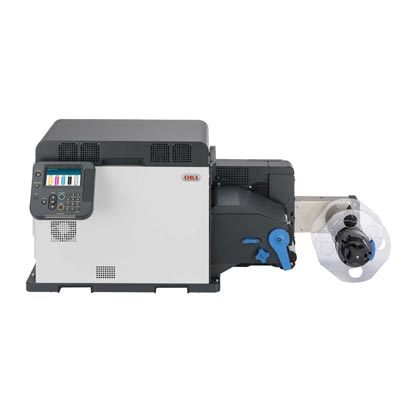
Desktop colour label printers, such as the OKI Pro series; are the logical starting point for Australian SMEs moving from outsourced labels to in-house production. They are compact enough to fit a standard bench, run on standard power, and produce full-colour product labels on demand without the capital commitment of an industrial press.
OKI-type units use LED/laser toner technology to deliver resolutions typically from 600 × 600 dpi up to 1200 dpi on coated papers and compatible synthetics. Print speeds suit short to medium job lengths—hundreds to a few thousand labels per session. They handle pre-die-cut roll stock or sheet formats and connect directly to a PC via USB or Ethernet.
The practical trade-off: desktop units have a finite duty cycle. Running them beyond recommended daily volumes accelerates component wear and raises maintenance costs. They are an excellent step-change from outsourcing, but businesses that grow quickly into thousands of labels per day will outgrow them within two to three years. Build that trajectory into your buying decision from day one.
2. Industrial Digital Label Printers — Best for High Volume, Full Colour
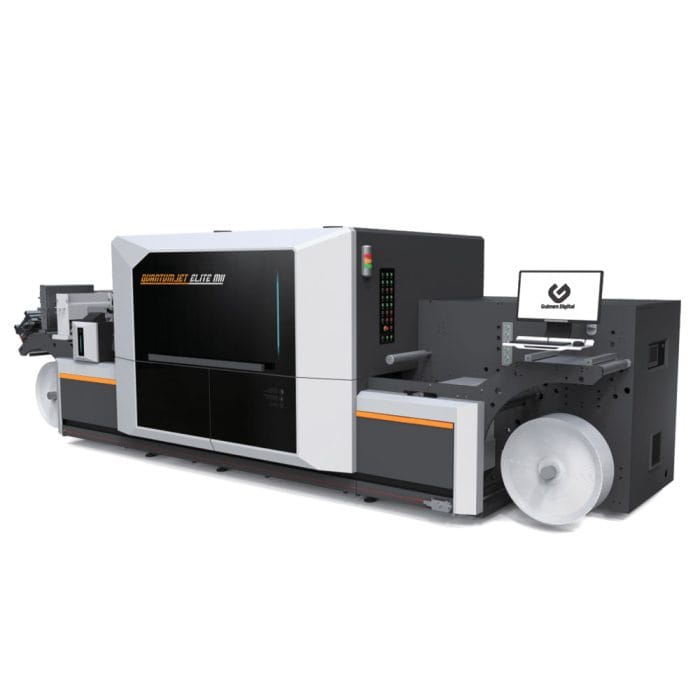
Industrial digital label printers such as the Quantumjet Elite M2 are designed for manufacturers and print shops that need continuous, full-colour production at commercially meaningful throughput. These are roll-to-roll inkjet or toner systems running at speeds measured in metres per minute, handling wider webs, heavier roll weights and higher daily duty cycles than any desktop device.
The digital label printing market reached USD 12.12 billion in 2025 and is projected to exceed USD 20.7 billion by 2035, driven by exactly the conditions facing Australian manufacturers: short runs, frequent design changes, on-demand production and variable data requirements. Industrial digital systems are the primary beneficiary of this shift.
For a mid-size food manufacturer running 15 SKUs with seasonal variants, regular artwork refreshes, and batch-coded labels with variable expiry dates, an industrial inkjet system eliminates plate costs, removes minimum order quantities, and collapses lead times from three weeks to the same day. That operational shift is not incremental—it changes how quickly the business can respond to retailers, regulators and consumers.
3. Thermal Label Printers — Best for Monochrome Logistics and Barcode Labels
Thermal label printers are the workhorses of Australian warehousing, logistics and manufacturing traceability. They produce fast, reliable monochrome output with near-zero warm-up time, low consumable cost, and a durability in industrial environments that colour inkjet and laser systems cannot easily match.
The global thermal printing market was valued at USD 51.29 billion in 2025 and is forecast to reach USD 79.07 billion by 2033 at a 5.7% CAGR—reflecting how embedded thermal printing is in the global supply chain. In Australian warehouses, 4" × 6" direct thermal shipping labels, GS1-128 carton labels, and SSCC pallet labels are almost universally printed on thermal devices.
Direct thermal suits short-life labels, shipping labels, pick tickets, temporary tags; where the heat sensitivity of the media is not a limitation. Thermal transfer suits labels that must remain legible for months or years in demanding conditions: asset tags, chemical drum labels, outdoor inventory markers. Full-resin ribbons on synthetic substrates produce labels that resist chemicals, abrasion and temperature extremes well beyond what direct thermal can achieve.
For barcode-dependent operations, print at a minimum of 300 dpi. Labels printed at 203 dpi can produce technically readable barcodes, but quiet-zone errors and print inconsistencies at that resolution are a common cause of retailer chargebacks—a cost that compounds quickly across high-volume logistics operations.
4. UV Label Printers — Best for Chemical-Resistant and Outdoor Labels
UV label printers use ultraviolet-curable inks that are instantly fixed by UV lamps as they leave the printhead. The result is a print that bonds to the substrate at a molecular level rather than sitting on the surface—producing labels with outstanding resistance to chemicals, abrasion, moisture, UV light and temperature variation.
This chemistry is non-negotiable for specific Australian regulatory contexts. GHS (Globally Harmonized System) hazardous chemical labels must remain legible throughout the product's lifecycle, including after contact with the very substance they are labelling. A water-based pigment inkjet label will not survive on a drum of industrial solvent. A UV-cured label on compatible synthetic media will.
UV systems also enable white ink printing on clear, metallic and coloured substrates—essential for premium cosmetics labels on clear bottles, wine labels on dark glass, and chemical labels on dark HDPE containers.
5. Roll-to-Roll Label Printers — Best for Long Runs and Production-Line Integration
Roll-to-roll describes a media handling configuration rather than a print technology—but it defines the entire character of how a label printing machine operates at production scale. The printer unwinds blank label stock from a feed roll, prints the full web, and rewinds finished output onto a take-up roll ready for finishing or direct application via an automatic labeller.
This configuration minimizes operator intervention, enables continuous production at rated speed, and integrates directly with downstream finishing equipment. A roll-to-roll inkjet or toner system paired with a laminator, die-cutter and slitter becomes a complete label converting line—producing finished, cut, laminated, rewound rolls from blank stock in a single workflow.
For trade printers and larger manufacturers, the efficiency advantage is significant. Roll-to-roll operation eliminates the per-job handling overhead of sheet-fed systems and scales linearly with run length. As print volumes grow, the same system continues to perform—because the throughput bottleneck shifts to finishing and application, not the printer itself.
6. Label Finishing Machines — Die-Cutting, Laminating and Rewinding
A label finishing machine such as the GD QuantumFlex converts printed rolls into ready-to-apply labels. Printing without finishing is half the job: a roll of digitally printed but uncut labels cannot be loaded into an automatic labeller, packaged for retail, or applied on a production line.
Finishing functions include:
- Laminating: applying a protective film over the print for gloss, matte or soft-touch aesthetics, moisture resistance, scuff resistance, and extended label life
- Die-cutting: cutting labels to shape using rotary or semi-rotary steel dies, or laser cutting for complex geometry and short-run flexibility without tooling cost
- Matrix removal: stripping the waste skeleton of label material from around die-cut shapes
- Slitting: cutting a wide web into multiple narrower rolls simultaneously
- Rewinding: producing finished rolls at the correct outer diameter, core size and wind direction for specific labelling equipment
The critical planning error Australian manufacturers make is specifying a printer without specifying a finishing workflow. If your automatic labeller requires 76 mm core, 250 mm OD, outside wound, your finishing equipment must deliver exactly that. Mismatched specifications cause application failures on the line—and the cost of a misspecified finishing system is discovered at the worst possible moment.
How to Choose the Right Label Printer for Your Business
The decision framework is straightforward when you ask the right questions in the right order.
Step 1: Define your real volume. Not today's volume—your volume in 18 months, accounting for new product launches, seasonal peaks and growth. Undersizing a label printer is a common and expensive mistake. Upgrading mid-cycle disrupts production, wastes capital and delays ROI.
| Daily volume | Appropriate system |
|---|---|
| Up to ~2,000 labels | Desktop colour or compact industrial |
| 2,000–20,000 labels | Mid-range industrial digital |
| 20,000+ labels | High-speed industrial or commercial press with full finishing |
Step 2: Determine your colour requirement. If you need full-colour branding, ingredient panels, product photography, regulatory layouts in CMYK; you need digital colour (inkjet, toner or UV). If your labels are monochrome barcodes, text and simple graphics, thermal transfer is faster and cheaper per label than any colour technology.
Step 3: Map your media and durability requirements. Identify every substrate you need to print on and every environmental condition your labels must survive. Freezer labels on polypropylene, GHS labels on HDPE drums, wine labels on glass bottles in ice buckets, and shipping labels on cardboard cartons all require different substrate-ink-adhesive combinations. Get this wrong and you will have beautifully printed labels that fall off, fade or smear.
Step 4: Decide your finishing needs. Do you need custom shapes? Lamination for protection or premium aesthetics? Rolls configured to a specific core and OD for your labeller? If yes, specify finishing equipment before you finalise the printer—because the two systems must be compatible.
Step 5: Calculate total cost, not sticker price. A label printer is not a one-time purchase. Inks, media, ribbons, maintenance, operator time and downtime all carry ongoing cost. Model the cost per 1,000 labels across your typical job mix and compare that to your current outsourced rate, including rush fees, MOQ waste and lead time costs.
Prefer to talk it through? Call (03) 9318 7177. Gulmen Digital's team is in Ravenhall, VIC.
Label Printer Buying Guide for Australian Manufacturers — Key Specifications
- Print resolution: Measured in dpi. 600 dpi is the practical minimum for consumer-facing product labels with fine text and regulatory information. 1200 dpi or higher is preferable for cosmetics, wine and any label where small type must remain sharp at 6pt or below. For logistics barcodes, 300 dpi is the recommended floor—anything lower risks scan failures and retailer chargebacks.
- Print speed: Quoted as labels per minute (desktop systems) or metres per minute (industrial roll-to-roll). Evaluate speed at your target resolution and typical ink coverage. A printer rated at 30 m/min at draft quality may run at 8–12 m/min at production quality. Confirm real-world speeds for your job type before purchasing.
- Maximum media width: Determines the largest label you can produce and how many labels you can print across in a single pass. A wider web means higher effective throughput for small labels. Confirm your labeller accepts the roll dimensions the printer and finisher produce.
- Ink or toner type: Dye-based inks offer vibrant colour but limited light and water resistance—acceptable for indoor, short-life applications. Pigment inks provide better durability for most product label applications. UV-curable inks deliver the highest chemical and abrasion resistance. Thermal transfer resins offer excellent durability for synthetics at low cost. Match the ink chemistry to your specific durability and regulatory requirements.
- Connectivity: USB and Ethernet are standard. Wi-Fi is useful for flexibility in production environments where cabling is difficult. Industrial environments with existing ERP, WMS or MES infrastructure need to confirm driver compatibility and whether the printer supports standard label languages (ZPL, EPL, TSPL) or requires a dedicated RIP.
- Media support: Verify the printer handles your specific substrates—not just generic paper and polypropylene, but your actual label stocks with your actual adhesives. Request media testing on your materials before committing to a system. A reputable Australian supplier such as Gulmen Digital will test your substrates and confirm compatibility as part of the specification process.
- Serviceability: Industrial label printers are production-critical equipment. Downtime is not a software bug—it is a halted production line. Confirm: local service coverage, response time commitments, parts availability in Australia, and whether consumables such as printheads are stocked locally or require international freight.
Industry-Specific Label Printer Recommendations
Food & Beverage Manufacturers
FSANZ labelling requirements evolve regularly: allergen prominence rules, nutrition information panel formats, country-of-origin declarations and date-marking standards all change with meaningful frequency. For manufacturers across multiple SKUs, this means labels are never static—they need to be updated, reprinted and verified quickly.
- Low to medium volume: OKI-class desktop colour label printer for on-demand production of full-colour labels on coated paper or polypropylene. Capable of printing compliant ingredient panels, allergen declarations and barcodes in a single pass.
- Medium to high volume: Industrial inkjet label printer (Quantumjet-class) with pigment or UV inks for durable, high-quality labels across wide media. Supports variable data for batch codes, best-before dates and unique identifiers.
- Logistics labels: Industrial thermal label printer for outer carton GS1-128 barcodes and pallet SSCC labels, integrated with your WMS or ERP.
- Substrates: Semi-gloss paper for ambient products; white polypropylene with freezer-grade adhesive for chilled and frozen lines.
Cosmetics & Health
Small label areas, fine regulatory text, premium brand aesthetics and TGA-aligned compliance requirements make cosmetics and health the most technically demanding label segment for Australian SMEs. Labels must carry INCI ingredient lists in 6pt or smaller type, batch/lot numbers, expiry dates, and sometimes therapeutic claims—all within tight graphic layouts.
- Recommended approach: High-resolution digital colour label printer (desktop or industrial depending on volume) with 600–1200 dpi capability. Paired with lamination finishing for moisture, oil and abrasion resistance in bathroom and retail environments. Die-cutting for custom shapes—particularly important for dropper bottles, tubes and compact packaging where standard rectangles fail aesthetically.
Wine & Beverages
Wine labels are one of the most visually scrutinised labels in retail. Textured stocks, colour accuracy, and premium finishes define shelf presence. Vintage changes, export variants and cellar-door exclusives create frequent small-run requirements that conventional flexo printing handles poorly.
- Recommended approach: Industrial digital label printer with strong colour management, capable of printing on textured wine papers and synthetic ice-bucket stocks. Finishing with gloss or soft-touch lamination for premium aesthetics. For small producers, a desktop colour system handles cellar-door runs economically while maintaining professional output quality.
Chemical & Industrial
Australian chemical manufacturers working under GHS, ADG Code or export regulatory frameworks need labels that remain legible throughout a product's full service life—often years, in contact with the labelled substance itself.
- Recommended approach: UV inkjet label printer on high-durability synthetic substrates (PET, PVC, HDPE-compatible films). For simpler monochrome GHS symbols and text, thermal transfer with full-resin ribbon on synthetic face stock delivers compliance-grade durability at lower capital cost. Verify all label materials and inks against your specific chemical exposure conditions before production.
Logistics & Warehousing
Speed, reliability, barcode accuracy and system integration are the only metrics that matter in logistics labelling. Colour is irrelevant. Throughput and uptime are everything.
- Recommended approach: Industrial direct thermal label printer for short-life shipping labels; thermal transfer for longer-life inventory, asset and rack labels. Minimum 300 dpi resolution to meet GS1 and major retailer barcode standards. Integrate directly with your WMS or ERP via standard label languages. Plan for redundant units in high-volume operations—a single failed printer brings a production line to a stop.
Print Shops and Trade Printers
Trade printers adding digital label capability need a platform flexible enough to handle multiple clients, diverse substrates, short runs and fast turnarounds. The business model depends on changeover speed, colour consistency across jobs, and the ability to produce retail-ready finished rolls.
- Recommended approach: Industrial digital label printer (Quantumjet Elite M2-class) with roll-to-roll inkjet or toner. Comprehensive finishing line, GD QuantumFlex or equivalent; for laminating, die-cutting, matrix removal, slitting and rewinding. Colour management workflow capable of matching client brand colours consistently across jobs and across time.
The True Cost of a Label Printer in Australia
Australian manufacturers should budget across these approximate AUD ranges (ex-GST, indicative 2025–26 pricing). These are starting-point figures; actual costs depend on specific configuration, speed, web width and options.
Prefer to talk it through? Call (03) 9318 7177. Gulmen Digital's team is in Ravenhall, VIC.
Equipment (capital cost):
| System | Indicative AUD range |
|---|---|
| Desktop colour label printers | $3,000 – $12,000+ |
| Industrial digital label printers (inkjet or toner) | $60,000 – $250,000+ |
| UV label printers | $80,000 – $350,000+ |
| Industrial thermal label printers | $1,000 – $6,000 per unit |
| Label finishing machines (GD QuantumFlex class) | $50,000 – $250,000+ |
Finance and leasing arrangements are standard for industrial equipment and can distribute these costs over 36–60 months, preserving working capital.
Consumables (ongoing): Consumables are where total cost of ownership diverges from sticker price. Ink or toner, label media, ribbons (thermal transfer), laminate film, and dies all carry ongoing cost that compounds across months of production. High-coverage full-colour labels on premium synthetics consume significantly more ink per square metre than simple text labels on paper. Model your cost per 1,000 labels across your actual job mix—not an average—before committing to a technology.
Label media is frequently underestimated. Synthetic substrates cost more per roll than paper equivalents. Specialty adhesives (freezer-grade, high-tack, removable) carry price premiums. A machine that accepts generic media is worth more in practice than one locked to proprietary consumables.
Maintenance and service: Plan for annual servicing, periodic printhead replacement (inkjet), lamp replacement (UV), belt and roller wear parts, and calibration supplies. For UV systems, lamp assemblies are a significant replacement cost. Thermal printheads are consumable components—their lifespan depends on media quality, print density and cleaning discipline. Working with an Australian supplier who stocks local spare parts reduces the risk of extended downtime from international freight delays.
The real comparison point: Model total cost per label against your current outsourced rate across a 24-month period, including rush fees, MOQ-driven over-ordering, and write-offs from obsolete label stock when recipes, regulations or artworks change. For businesses with meaningful label volume, this analysis routinely demonstrates payback within two to four years on industrial equipment.
In-House vs Outsourcing Label Printing
The decision is not binary—most Australian manufacturers eventually land on a hybrid model: high-frequency, short-run and variable-data labels in-house; very long stable runs or specialist finishes outsourced to trade partners.
- In-house makes sense when you run multiple SKUs, change artworks frequently, need variable data (batch codes, expiry, serialisation), face lead times that create production risk, or write off significant quantities of obsolete pre-printed label stock.
- Outsourcing remains appropriate for very long stable runs where plate amortisation on flexo is competitive, highly specialist finishes (hot foil stamping, embossing, combination gravure-flexo effects) that require dedicated converting equipment, or when capital is constrained and label volume does not yet justify the investment.
Top 5 Questions to Ask Before Buying a Label Printer
1. What will our label volume be in 18–24 months, not just today?
Size for where you are going, not where you are. The cost of upgrading mid-cycle, lost production, resale losses, re-training; exceeds the marginal cost of buying appropriately from the start.
2. What environments must our labels survive?
Freezer, outdoor UV, chemical exposure, high humidity, autoclaving, submersion—each condition eliminates certain technologies and mandates others. Define your worst-case application before evaluating machines.
3. How often do we change artworks or add SKUs?
High artwork churn is the strongest argument for digital printing. No plates, no minimum orders, no lead time for new designs—just load a file and print. If your current process involves a two-week wait every time a nutritional panel changes, that friction has a measurable cost.
4. Do we need full colour or primarily barcodes and text?
This question separates the technology families. Colour inkjet or toner for branding-driven labels; thermal for operational and logistics labels. Many manufacturers need both, and they should be specified as separate systems rather than one compromise device trying to do both poorly.
5. What finishing is required, and is it specified alongside the printer? Die-cutting, laminating, slitting and rewinding must be specified in conjunction with the printer—not as an afterthought. Your labelling equipment, core sizes, roll diameters and label geometry must all align before you commit to a system.
Why Choose an Australian Label Printer Supplier
The global label printer market is well-supplied with online vendors, international distributors and grey-import equipment. The case for working with a local Australian specialist is not sentimental—it is operational.
- Local technical support and response time directly determines how quickly a production-critical fault is resolved. An international vendor's remote support line and a two-week freight lead time for a replacement printhead are not acceptable when your line is down. A Melbourne-based technical team changes that calculation entirely.
- Consumables and parts availability in Australia matters more than it appears during the purchase decision. Inks, media, ribbons, printhead assemblies and wear parts must be available locally in sufficient stock to support your production continuity. Confirm this with your supplier before purchasing, not after.
- Compliance knowledge specific to Australia is a genuine differentiator. FSANZ labelling requirements for food, TGA requirements for therapeutic goods, GHS for hazardous chemicals, GS1 standards for retail barcoding, and major retailer chargeback specifications all require label systems capable of meeting specific technical requirements. A supplier who understands these standards can specify the right resolution, substrates and workflow from the outset—avoiding compliance failures discovered at retailer audit or regulatory inspection.
- Training and workflow setup reduce the time from installation to productive operation. Colour management, media calibration, variable data configuration and finishing alignment are all disciplines where hands-on training from an experienced technician compresses months of trial-and-error into days.
- Gulmen Digital Machinery & Supplies operates from Ravenhall, VIC, and supplies label printing and finishing solutions across Australia. The business specialises in the full label production workflow—from OKI desktop colour printers for start-up volumes through to Quantumjet Elite M2 industrial systems and GD QuantumFlex finishing lines for high-throughput converting operations—supported by local technical expertise, Australian-stocked consumables and hands-on installation and training.
Gulmen Digital: The Right Label Printer Changes How Your Business Operates
The question Australian manufacturers should be asking in 2026 is not whether to invest in label printing capability.
The market has answered that question: digital label printing is growing at 5.5%+ annually, in-house production is increasing across every industry segment, and the businesses that move first gain compounding advantages in speed, cost and agility over those that remain dependent on external suppliers.
What's worth careful analysis is which label printer, in which configuration, paired with which finishing system, supported by which supplier—matched precisely to your volumes, compliance requirements, substrates and growth trajectory.
Getting that decision right from the start avoids the expensive second purchase that happens when a business buys for today and grows into constraints within 18 months.
Gulmen Digital's label printing specialists work through this decision systematically with each client: mapping your SKU profile, compliance requirements, substrate needs and growth plans to the right combination of equipment, consumables and support. The assessment is obligation-free and includes a cost-per-label model comparing your current outsourced spend to in-house production at realistic volumes.
Contact Gulmen Digital at 42 Orbis Drive, Ravenhall VIC 3023 to arrange a consultation or equipment demonstration.
Prefer to talk it through? Call (03) 9318 7177 or fill out the form in the page below. Gulmen Digital's team is in Ravenhall, VIC.
Frequently Asked Questions
What is the best label printer for small business in Australia?
For small Australian businesses producing full-colour product labels at low to medium volumes, a desktop colour label printer, such as an OKI Pro-series unit; provides professional quality without industrial-scale capital commitment.
It handles multiple SKUs, frequent artwork changes and short runs economically. For small businesses whose primary need is shipping and barcode labels, a desktop direct thermal printer is a lower-cost, faster entry point. The right answer depends on whether colour branding or operational labelling is the primary use case.
How much do label printers cost in Australia?
Desktop colour label printers start from approximately $3,000–$12,000 AUD. Industrial digital label printers range from $60,000–$250,000+ depending on speed, web width and features. UV label printers typically range from $80,000–$350,000+.
Industrial thermal printers cost $1,000–$10,000 per unit. Label finishing machines range from $50,000–$250,000+. Total cost of ownership, including inks, media, maintenance and service; is the more important figure, and Gulmen Digital models this against your specific job profile before any purchasing decision.
What labels are compatible with digital label printers?
Digital inkjet and toner label printers support a range of substrates including:
- Coated papers (matte, semi-gloss, gloss)
- White and clear polypropylene (PP)
- Polyethylene (PE)
- Polyester (PET)
- Vinyl films
Compatibility depends on the ink chemistry: water-based pigment inks require an inkjet-receptive coating; UV-curable inks suit specially formulated synthetics; toner systems work best on coated papers and specific synthetic stocks. Media should always be tested on the intended printer before committing to bulk stock. Gulmen Digital supplies matched media tested against each printer model in its range.
Do I need a label finishing machine as well as a printer?
If you print onto pre-die-cut label rolls (standard rectangles or circles in common sizes), you can apply labels directly without additional finishing equipment. If you need custom label shapes, protective lamination, or rolls configured to a specific core size and outer diameter for your automatic labeller, finishing equipment becomes essential. For any operation running industrial label volumes, a label finishing machine such as the GD QuantumFlex is part of the complete production workflow—not an optional accessory.
Is it cheaper to print labels in-house or outsource in Australia?
For businesses printing meaningful monthly volumes—typically from around 1,000+ labels per month with multiple SKUs and frequent artwork changes—in-house digital label printing is generally more cost-effective once equipment is properly utilised.
The comparison must include the full cost of outsourcing: per-unit price at your MOQ, rush fees, freight, write-offs of obsolete stock, and the operational cost of lead-time delays. For very long, stable, single-design runs, outsourced conventional printing (flexo or offset) may remain competitive. A cost-per-label model comparing both scenarios is the correct basis for the decision.
Can I print FSANZ- and TGA-compliant labels on an in-house label printer?
Yes. FSANZ and TGA regulate the content, format and legibility of information on labels—not the printing technology. Provided your printer produces the required resolution for readable text (including small ingredient lists and regulatory statements), accurate colour rendering for mandatory elements, and durable prints appropriate to the product's storage and handling conditions, in-house label printing fully supports compliance. A knowledgeable Australian supplier can specify the printer, substrate and ink combination that meets your regulatory environment. This is one area where the expertise of a local specialist delivers measurable risk reduction.
Which label printer is best for barcode and shipping labels in a warehouse?
Industrial thermal label printers—either direct thermal for short-life shipping labels or thermal transfer for longer-life inventory and asset labels—are the standard choice for Australian warehousing and logistics operations. Print at a minimum of 300 dpi to meet GS1 and major retailer barcode standards reliably. Integration with your WMS or ERP via standard label languages (ZPL, TSPL) is essential for high-volume environments. For operations where a single printer failure halts despatch, plan for redundant units.
What should I look for in an Australian label printer supplier?
Prioritise local technical service coverage and response time commitments; Australian-stocked spare parts and consumables; hands-on installation and operator training; demonstrated knowledge of FSANZ, TGA, GHS and relevant Australian regulatory standards; and a product range that covers your current needs and foreseeable growth.
A supplier who provides only the machine—without workflow guidance, media specification, colour management support and ongoing service—transfers all the implementation risk to your business. A complete solution provider reduces that risk substantially and improves the probability that the investment performs as expected from day one.



Comments ()