
Beer Label Printers: Pro Results at Any Scale
Meta description: Compare desktop, roll-fed & commercial beer label printers — waterproof, fridge-safe options for homebrewers & craft breweries. Australia buying guide included.
The right beer label printer is not a single machine — it is the combination of hardware, ink chemistry, and label media that produces durable, adhesive labels surviving condensation, ice buckets, and refrigeration at the volume you need. Choose the wrong category and you either overspend on industrial hardware or watch your labels peel off a sweating bottle by Saturday afternoon.
 Gulmen Digital
What Is a Beer Label Printer?
A beer label printer is any device or professional print service capable of producing self-adhesive labels that hold on glass or aluminium through cold storage, wet handling, and the particular brutality of an ice-filled esky. That definition eliminates most standard office printers immediately.
Standard office printers fail beer label work for three concrete reasons. First, they cannot feed die-cut label sheets or rolls reliably — they are calibrated for uniform, flat A4 stock. Second, they lack compatibility with waterproof synthetic media such as BOPP (biaxially oriented polypropylene) or polypropylene films. Third, most consumer inkjets use dye-based inks that bleed and fade the moment moisture reaches the surface. A label printed on plain paper with dye ink will smear inside a cold room within hours.
The three categories that work are:
- Desktop inkjet + waterproof label sheets — for homebrewers printing fewer than 200 labels per month
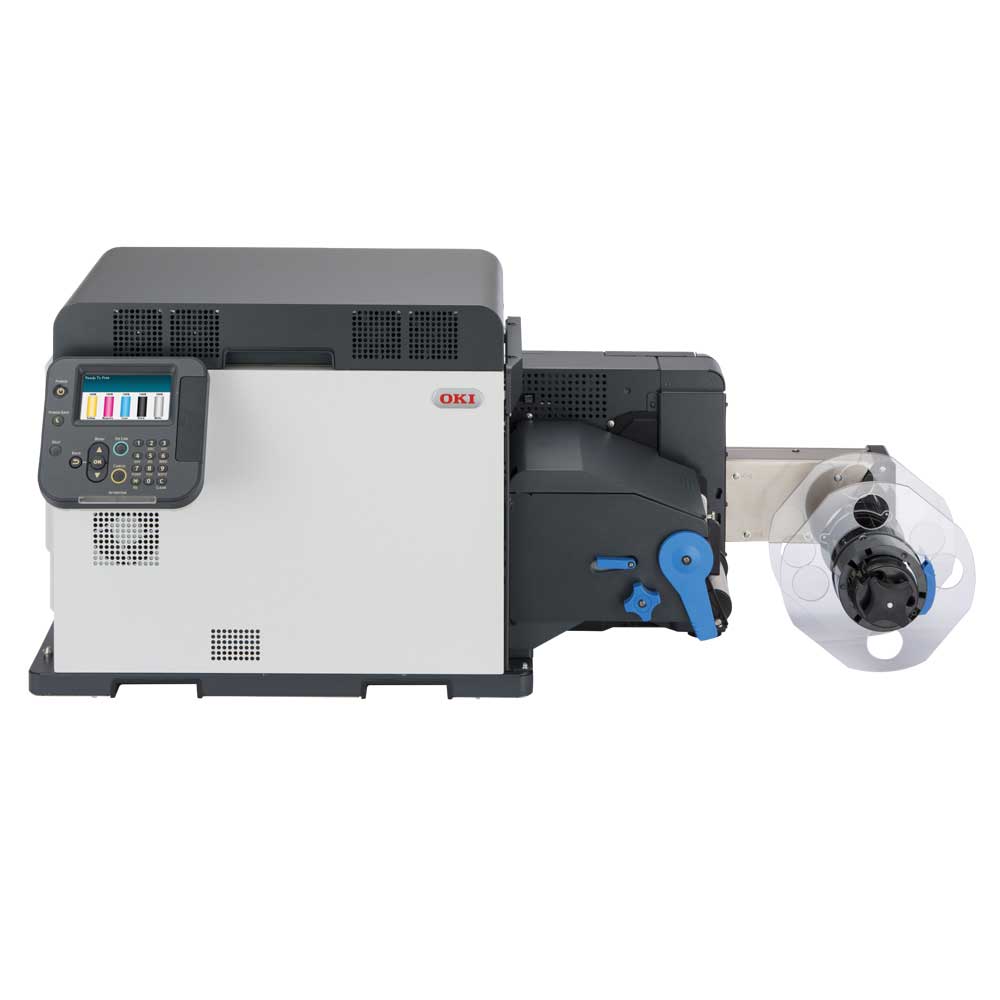
- Dedicated colour label printers on rolls, such as Primera, Afinia, and Epson ColorWorks units — for nano and craft breweries
- Commercial roll-fed digital presses or outsourced professional label printing — for production breweries needing tens of thousands of labels per SKU
The decision between categories comes down to volume first, then economics. Choosing correctly at the start saves you from a hardware purchase you either outgrow in three months or never justify.
Types of Beer Label Printers Compared
Desktop inkjet + waterproof label sheets
A consumer inkjet paired with waterproof BOPP label sheets is the cheapest viable entry point for craft beer label printing. Hardware costs run roughly $150–$400, and per-label media cost lands around $0.08–$0.20 depending on sheet size and ink coverage.
This setup works for homebrewers, club batches, and initial test runs where you need dozens to a couple of hundred labels. The workflow is manual, you print, cut, and apply by hand; and the durability ceiling is lower than roll-fed systems even with good media. If your inkjet uses pigment cartridges and you source true BOPP inkjet sheets rather than matte paper marketed as "waterproof," the results are respectable. Cut corners on either, and expect labels that dissolve in an ice bucket.
Dedicated colour label printers
Dedicated colour label printers are the core recommendation for nano and small craft breweries managing multiple SKUs, seasonal releases, and regular short runs. Units from Primera, Afinia, and Epson ColorWorks print directly onto label rolls with built-in cutters, producing professional output without external finishing equipment.
These machines typically cost $2,500–$5,000 for craft-scale models, print up to 8 inches wide, and reach resolutions of 1200–4800 dpi. All-in cost per label, ink plus BOPP roll media; generally runs $0.15–$0.40, varying by artwork coverage and roll pricing. The critical advantage over a desktop inkjet is not just quality; it is workflow speed, roll-based feeding that eliminates sheet-by-sheet handling, and pigment ink systems engineered for moisture and UV resistance from the factory.
Commercial roll-fed and digital label presses
Commercial presses such as Epson SurePress and HP Indigo-class systems start at $50,000+ and scale well above that with finishing equipment. Most craft breweries access this tier through outsourced label printing services rather than owning the hardware. At high volume, per-label costs drop well below in-house economics, and you gain access to inline coatings, spot varnish, and tight Delta E colour tolerances that desktop systems cannot match.
Print-on-demand label services
Print-on-demand services carry no capital cost and suit seasonal or limited-edition releases where the print run is too small to justify hardware investment. Per-label cost is higher than in-house options at comparable volumes, but you avoid maintenance, consumable sourcing, and operator time. For a brewery releasing two new seasonal beers per year in 200-label runs, a label printing service is almost always cheaper than owning a dedicated printer.
Side-by-side comparison
| Category | Upfront cost | Cost per label | Minimum practical run | Waterproof rating | Best for |
|---|---|---|---|---|---|
| Desktop inkjet + sheets | ~$150–$400 | $0.08–$0.20 | Dozens | Good (with BOPP + pigment) | Homebrewers, test batches |
| Dedicated colour label printer | ~$2,500–$5,000 | $0.15–$0.40 | Hundreds | High (BOPP + pigment rolls) | Nano & craft breweries |
| Commercial roll-fed press | $50,000+ | Very low at volume | Thousands | Very high | Production breweries |
| Print-on-demand service | None | Higher per label | 100–500+ | High (specify beer-grade) | Seasonal, limited editions |

Key Specs to Check Before Buying a Beer Label Printer
Waterproof and condensation-resistant media
Beer bottles sweat. Labels must survive at least eight hours at 4°C in a full ice bucket without peeling, wrinkling, or losing ink. The only media that reliably meets this standard is BOPP or polypropylene film with a permanent, cold-temperature acrylic adhesive rated for glass and aluminium surfaces. Coated paper labels can work with protective laminate, but film is the safer default for anything spending time in a fridge or esky.
Ink type: pigment versus dye
Dye-based inks dissolve in water — that is not a performance limit to manage around, it is a disqualifying characteristic for beer labels. Pigment-based inks suspend pigment particles on or within the media coating, resisting moisture, smearing, and UV fading. UV-cured inks offer similar or better durability and are common in commercial label presses. If your inkjet or label printer ships with dye cartridges as standard, check whether pigment alternatives exist before purchasing.
Label sizes and roll width
Confirm your printer handles your actual label formats before buying:
- 12 oz / 355 ml bottle wrap: approximately 3.5" × 4" front label
- 750 ml Belgian-style bottle: approximately 4" × 5.5"
- Crowler (32 oz) full wraparound: significantly wider; verify maximum print width and roll capacity
Most dedicated colour label printers supporting up to 8" width comfortably cover bottle and standard can formats. Crowlers require checking carefully.
Resolution and finish
Target 1200 dpi minimum for sharp small text — ABV declarations, government health statements, and legal copy at 6pt all need this. Prosumer units advertise up to 4800 dpi, which benefits photographic artwork and fine gradient fills. For finish, gloss film delivers vibrant colour suited to bold craft branding; matte reads as more artisanal and improves legibility under fluorescent bar lighting. Foil-effect output typically requires metallic media or a separate hot-stamp process — desktop label printers cannot replicate true foil inline.
Software and templates
Ensure your chosen printer works with Adobe Illustrator, Canva exports (PDF), or Affinity Publisher at minimum, and that your workflow supports ICC colour profiles matched to your label stock. Many dedicated label printers bundle proprietary RIP software; confirm it accepts your file formats. Look for pre-sized templates covering 355 ml, 750 ml, and crowler formats — these eliminate the alignment errors that waste your first roll of BOPP.
Gulmen DigitalCost Breakdown: How Much Does a Beer Label Printer Cost?
Hardware is the visible cost; consumables are where the real calculation lives.
A desktop inkjet setup costs $150–$400 upfront, with per-label media cost of $0.08–$0.20. A dedicated colour label printer costs $2,500–$5,000 upfront, with all-in per-label cost of $0.15–$0.40 including ink and BOPP rolls. Commercial presses exceed $50,000 but deliver the lowest per-label economics at scale.
The break-even between in-house printing and outsourcing typically falls around 500–1,000 labels per month. Below that threshold, outsourcing usually wins on pure economics because hardware cost amortises slowly. Above it, in-house printing pays for itself — and gives you the agility to change a label overnight without a reorder lead time.
Hidden costs matter in this calculation. Ink wastage during head-cleaning cycles, calibration test prints, and media wasted on misfeeds all lift real per-label cost above the theoretical figure. Build in a 10–15% waste allowance when modelling your economics, and factor periodic maintenance kits into annual operating cost.
Buying a Beer Label Printer in Australia
Australia's craft beer market supports a genuine local ecosystem for brewery label printers. Major brands including Primera, Epson ColorWorks, and Afinia are stocked by Australian distributors, which matters for three reasons: warranty validity, power compatibility, and service access.
Grey imports — units purchased directly from overseas retailers — frequently void manufacturer warranties and arrive with power supplies requiring adapters. When a printhead fails mid-run before a weekend market, international return shipping is not an option. Buy through an authorised Australian distributor and confirm the supplier offers local repair support.
On landed cost: importing hardware independently attracts approximately 5% customs duty plus 10% GST on the landed value, which can add meaningfully to the effective purchase price. Local purchases include GST on the invoice, deductible as a business input tax credit for registered breweries; with no separate duty calculation required.
Australian craft breweries operating under the Small Brewer Rebate scheme can typically capitalise label printer hardware as a depreciable business asset, potentially eligible for small business instant asset write-off provisions. Confirm the treatment with your accountant before purchasing.
For label media, Australian label stock suppliers carry BOPP rolls and polypropylene sheets compliant with Australian food-contact labelling requirements. Confirm that the adhesive specification covers refrigerated and condensation-prone conditions — not all "cold storage" adhesives perform equally on sweating glass.
How to Print Beer Labels at Home or In Your Brewery
Step 1 — Design: Build your label in Canva, Adobe Illustrator, or Affinity Publisher. Set the document to your container's exact label dimensions, work at 300 dpi minimum, and add 3 mm bleed beyond the cut line on all sides. Keep legal text — ABV, standard drink count, government health advisory — at 6pt minimum and in high-contrast colours.
Step 2 — Test print: Load plain paper and print a test at full size before touching your label stock. Check alignment, text legibility, and bleed coverage. Adjust once on paper rather than wasting BOPP roll.
Step 3 — Calibrate colour: Apply the ICC colour profile matched to your specific label media. Most dedicated label printer drivers include media-specific profiles; using the wrong one produces dull, inaccurate colour that no amount of design refinement fixes.
Step 4 — Print and dry: Print your batch and allow approximately 30 seconds of drying time before handling, particularly on gloss BOPP where smearing is more likely. Built-in cutters on roll-fed printers handle separation automatically; sheet-based setups need a rotary trimmer or guillotine.
Step 5 — Apply: Self-adhesive BOPP labels apply by hand or with a basic label applicator — the standard choice for most craft and nano breweries. Wet-glue paper labels require a dedicated applicator machine but produce a premium, traditional look that suits boutique bottle-conditioned styles. Shrink sleeves offer 360° artwork and outstanding moisture performance but need heat-shrink equipment and are usually sourced from commercial printers rather than printed in-house.
 Gulmen Digital
FAQ
What is the best beer label printer for a small craft brewery? A dedicated colour label printer in the $2,500–$5,000 range, such as models from Primera, Afinia, or Epson ColorWorks; is the best match for most small craft breweries. These printers handle roll-fed BOPP with pigment inks, support short runs without minimum order requirements, and accommodate frequent design changes for seasonal releases. If your monthly volume stays below a few hundred labels, a desktop inkjet with waterproof sheets may serve you adequately while you grow.
Can I print waterproof beer labels at home that survive an ice bucket? Yes, but only with the right combination of media and ink. Pair a desktop inkjet that supports pigment cartridges with genuine BOPP waterproof inkjet label sheets — not matte paper marketed loosely as water-resistant. Test a printed bottle in an ice bucket for eight hours before committing to a full batch; if the label survives without lifting or smearing, your setup is beer-grade.
How much does it cost to print beer labels yourself versus ordering them from a printer? In-house printing on a desktop inkjet runs roughly $0.08–$0.20 per label; a dedicated colour label printer brings all-in costs to $0.15–$0.40 per label after hardware amortisation. Outsourced label printing costs more per label at low volumes but eliminates hardware, maintenance, and operator time. The crossover where in-house wins on economics typically falls between 500 and 1,000 labels per month.
Where can I buy a beer label printer in Australia? Purchase through authorised Australian distributors for brands including Primera, Epson ColorWorks, and Afinia — buying locally ensures valid warranty coverage, correct 230V power, and access to local service and spare parts. Avoid grey imports, which can void warranty and create supply headaches when consumables or repairs are needed. Australian label media suppliers stock BOPP rolls and food-contact-compliant adhesives suitable for beer packaging.
What label paper or media do I need for a beer label printer to make fridge-safe labels? Use BOPP or polypropylene film media with a permanent, cold-temperature acrylic adhesive rated for glass and aluminium surfaces. These synthetic films resist moisture absorption, stay flat under condensation, and hold their adhesion through repeated refrigeration cycles. If you prefer a paper aesthetic, specify coated wet-strength paper with a protective varnish or laminate overlay — but film outperforms paper under genuine beer-service conditions every time.

Comments ()